Style Chat: AI Outfit Maker
dr-code.aiBeauty
4.26.00 Reviews
- Version
- 1.0.106
- Installs
- 50.00K
- Age Rating
- Everyone
Screenshots
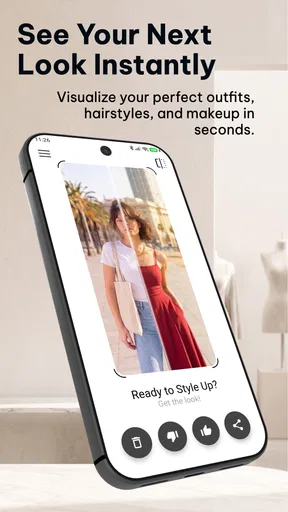
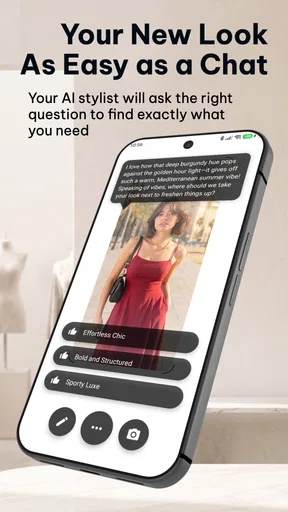
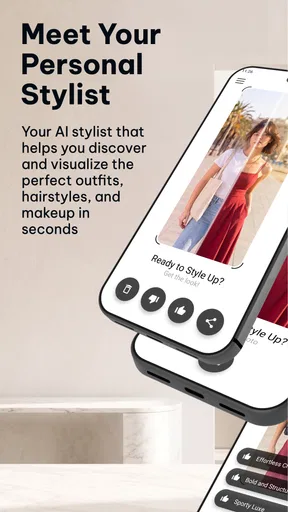
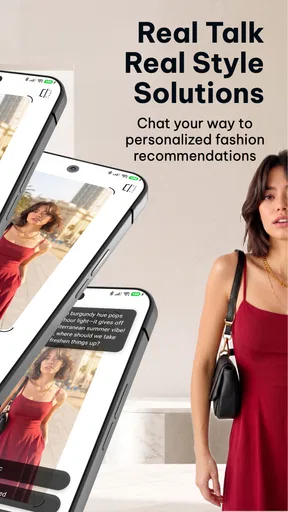
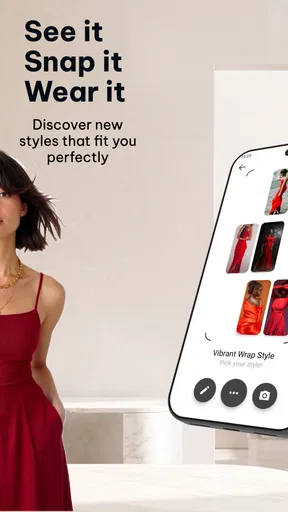

Our Review of Style Chat: AI Outfit Maker
 Analysis by Appyee
I approached Style Chat: AI Outfit Maker as a practical beauty tool rather than a novelty filter. Its main idea is simple: you use an AI stylist to explore clothing, hair, and makeup looks, then decide whether any of those ideas are useful in real life. After spending time with it, I found the app most interesting when I treated the generated images as a private styling sketchbook, not as a promise that every result would look exactly like me.
That distinction matters. Virtual try-on tools can be fun, but they also deal with personal photos and appearance choices, so trust is part of the experience. I paid attention to the choices visible while using the app, the moments where a user needs to decide what to share, and the amount of control the results actually give back. My overall impression is positive for experimenting with looks, although I would use it thoughtfully and would not make it my only source of advice for a major appearance change.
What the app feels like in everyday use
The app comes from dr-code.ai and sits in the beauty category. It is free to install, with optional purchases ranging from $0.49 to $34.99 per item. The audience is broad because its content rating is Everyone, but the practical audience is narrower: people who enjoy visual experimentation and want quick inspiration before shopping, changing a hairstyle, or trying a different makeup direction.
The short label, “Style Chat,” gives a good sense of the intended interaction. This is not just a static catalog of clothes. The appeal is the conversation between your starting image, your styling request, and the generated result. I found that approach more engaging than scrolling through preset outfit boards because it encourages a specific question: what would this type of outfit, hair idea, or makeup choice look like on me?
The app has attracted over 50 thousand installs and holds a 4.2 average from roughly 400 ratings. Those figures suggest a healthy level of interest, but I would not treat them as proof that every generated look will be accurate. AI styling depends heavily on the photo, the request, and the visual details the system can interpret. A strong rating tells me the concept works for many users; it does not remove the need to judge each result carefully.
At the time of my review, the app was on version 1.0.106 and required iOS or Android equivalent version 11 or later. That makes compatibility worth checking before downloading, especially if you keep an older phone for everyday use. The free entry point is helpful because you can understand the basic workflow before deciding whether paid items are worthwhile.
Starting with a useful photo
The quality of the starting image makes a bigger difference than I expected. A clear, front-facing photo with enough light gives the system more to work with than a dim selfie, a heavily filtered portrait, or a picture where clothing is hidden by another person. For outfit changes, a visible upper body is more useful than a tightly cropped face. For hair and makeup, a straightforward face photo usually gives the result a better chance of preserving recognizable features.
My practical advice is to prepare separate photos for separate goals. Use one image where your face is easy to see for makeup or hair exploration, and another with more of your body visible for clothing ideas. Trying to make one awkward photo serve every purpose can lead to a less convincing result. This is one of the app’s less obvious trade-offs: convenience is highest when you reuse an existing picture, but control improves when you choose the image around the styling task.
I also recommend removing distractions before uploading anything. Sunglasses, dramatic lighting, busy backgrounds, and extreme poses can make the output harder to evaluate. That does not mean the app is unusable with casual images; it means the result should be read as an interpretation, not a fitting-room mirror.
Where the AI stylist is genuinely helpful
The strongest use case is early decision-making. Suppose I have a dinner invitation and a wardrobe full of pieces that I rarely combine. Instead of changing several outfits in front of a mirror, I can use the app to explore a few directions first: a softer color palette, a more structured silhouette, or a different balance between casual and polished. The generated images help me eliminate ideas quickly and identify combinations worth trying with real clothes.
It is also useful before shopping. I would not rely on an AI image to confirm exact fit, fabric behavior, or color accuracy, but I can use it to decide whether a general style deserves attention. That saves time when browsing because I am looking for a direction rather than buying a garment solely because it looked attractive on a model.
Hair and makeup experimentation may be even more valuable for people who feel overwhelmed by choices. A user preparing for a celebration can compare a few broad moods before showing a reference to a stylist or practicing at home. The important word is “broad.” The app can help communicate an idea, but it should not replace a professional consultation for hair texture, skin sensitivity, corrective makeup, or a dramatic color change.
Another good use is creating a personal style reference. After generating several looks, I would save the ideas that feel realistic and note what they have in common: similar necklines, repeated colors, a certain hair length, or a preferred makeup intensity. That turns the app from a one-off image generator into a way of noticing patterns in my own taste.
What the results cannot reliably settle
Virtual clothing is not the same as trying on a real garment. It cannot tell me whether a fabric feels comfortable, whether sleeves restrict movement, or whether a cut sits correctly when I walk, sit, or bend. Even an attractive image may hide practical problems. I would always use the generated outfit as a prompt to inspect my actual wardrobe, not as evidence that a particular item will fit.
Hair results need the same caution. An image can show the general impression of bangs, layers, length, or color, but it does not explain maintenance, styling time, or how the change will behave with a person’s natural texture. Makeup previews can suggest placement and intensity, yet they cannot test product compatibility or account for every skin concern. The app is best at visual conversation and weakest at physical verification.
There is also a risk of overvaluing a polished result. AI-generated styling can smooth details and create a version of an outfit that is more coordinated than real life. I found it more useful to ask, “Which part of this idea can I borrow?” rather than, “Can I reproduce this image perfectly?” That mindset keeps the tool inspiring without letting it dictate an unrealistic standard.
Trust begins with the photo decision
Because the app works with appearance-related images, I would pause before selecting a photo. I would avoid using pictures that include children, friends, identification documents, private backgrounds, or anything else unrelated to the styling task. Cropping the image first is a small but meaningful way to reduce unnecessary exposure. It also makes the visual subject clearer, which can improve the styling request itself.
I would not upload a work badge photo, a passport-style image, or a picture taken in a private setting simply because it is already on my phone. A clean, ordinary portrait is enough for most experiments. This is a better habit than trying to get the most detailed possible image at any cost.
Visible user choices matter here. Before using any image-based feature, I would read the permission prompt carefully and grant only what is needed for the action I am taking. If the app presents choices about selecting a photo, taking a photo, or continuing without one, I would choose the narrowest option that supports my goal. I would also look for account and privacy controls inside the app rather than assuming that deleting a generated image has the same effect as removing an uploaded source photo.
I am deliberately careful about separating what I can control on the device from what may happen after an image is submitted. A user can choose a limited photo, avoid sensitive surroundings, and review visible settings. Those are concrete actions. I would not make broader assumptions about retention, training, sharing, or deletion without reading the app’s current privacy information and the wording shown during use.
Controls, purchases, and user agency
The free installation lowers the risk of trying the basic experience, but optional purchases deserve attention. The available items span from a small charge to a much larger one, so I would not tap through a payment screen casually. I would first decide whether the feature is part of a repeatable workflow for me or merely an interesting result I want to see once.
My preferred approach is to test one clear task before spending anything: for example, creating outfit inspiration for an upcoming event or comparing two hair directions. If the free experience already answers that question, there may be no reason to buy more. If I do choose a purchase, I would confirm the item, price, and platform payment prompt rather than relying on a fast tap.
This is also where the app’s conversational format can work for or against the user. A chat-like flow makes it easy to keep refining an idea, but that same ease can encourage endless tweaking. I found it helpful to set a stopping rule: generate a small set of distinct directions, choose the two most realistic, and then move to the mirror or wardrobe. Without that boundary, the process can become more about collecting images than making a decision.
For privacy-minded users, I would check the app’s current permission and account screens directly after installation. Look for the ability to manage access through the operating system, understand whether an account is required for the desired workflow, and identify any controls for generated or uploaded content. These checks are more useful than assuming that a beauty app has the same data practices as a photo editor or social network.
I would also keep the app updated through the normal platform channel, since version 1.0.106 is the version associated with my review and controls can change over time. Updates may alter the interface, image workflow, or purchase presentation. Rechecking permissions after a major update is a sensible habit, especially for an app centered on personal photographs.
Three workflows that make it more useful
First, use a constraint instead of a vague request. Rather than asking for a “nice outfit,” I would define the occasion, comfort level, and one item I already own. For example, I might start with a jacket that rarely gets worn and ask for a look that remains practical for a normal day. A constraint makes the output easier to judge and reduces the temptation to admire an attractive but impractical fantasy.
Second, compare categories one at a time. If I change clothing, hair, and makeup simultaneously, I cannot tell which change actually improves the look. I would begin with the outfit, then explore hair, and only afterward consider makeup. This staged method is slower than requesting a complete transformation, but it produces more useful information because each decision remains visible.
Third, turn the result into a real-world checklist. After choosing an appealing image, I would write down the transferable elements: a color combination, a neckline, a hairstyle shape, or the level of makeup. Then I would test those elements with clothes and products I already have. This avoids buying an entire new look based on a generated picture and makes the app useful even when the exact output is not reproducible.
A fourth workflow is valuable for shopping fatigue. I would generate ideas before opening a retailer’s app, then search only for pieces that match the chosen direction. That changes the order of decisions: instead of being persuaded by whatever appears first, I begin with a personal brief. The app cannot guarantee a good purchase, but it can help me become more deliberate.
Who should use it, and who should skip it
I think the app suits curious users who want visual inspiration without immediately booking a stylist or trying on several combinations. It is especially approachable for someone who knows they want a change but cannot describe the change in words. Seeing an approximate direction can make a conversation with a friend, makeup artist, hairstylist, or clothing assistant much easier.
It can also suit people who enjoy experimenting privately. Not every style idea needs to be posted publicly or tested in a shop. Creating a few possibilities on a phone can be a low-pressure way to decide whether a bolder color, different silhouette, or new makeup mood feels personally comfortable.
I would be more cautious if you are very sensitive about appearance comparisons, expect exact body representation, or need reliable fit information. The app may be frustrating if your goal is technical wardrobe planning, precise color matching, or a professional assessment of hair and skin. In those cases, a real fitting room, a trusted stylist, or a specialist consultation is the better option.
I would also skip it for a highly private photo unless I had reviewed the current controls and privacy information carefully. The convenience of an AI preview is not worth using an image that contains more personal context than the styling task requires. A user who does not want to make those decisions may feel more comfortable with offline outfit planning or a conventional mood-board app that does not work from personal portraits.
How it compares with familiar alternatives
Compared with browsing social media or fashion boards, this app is more personal because the starting point is your own appearance. That can make the ideas easier to imagine, but it also means the privacy decision is more direct. Social feeds offer a wider range of real outfits; this app offers a quicker bridge between inspiration and your own image.
Compared with a standard photo editor, its value is not mainly manual retouching. I would choose a conventional editor when I need precise control over color, cropping, or presentation. I would choose Style Chat when I want to explore a styling direction without manually reconstructing clothing, hair, and makeup in layers.
Compared with an in-person stylist, the app is faster, cheaper to try, and available whenever an idea occurs to me. It is also less dependable for fabric, fit, maintenance, personal coloring, and lifestyle details. The two tools serve different stages: this app is useful for generating possibilities, while a person is better at translating one possibility into a realistic plan.
Compared with shopping directly, the app encourages a pause before purchase. That is its most practical advantage. It can help me decide what I am actually looking for instead of browsing until something catches my eye. The trade-off is that the image may make a look seem more coherent than the individual products will be in real life, so I still need to inspect measurements, materials, return terms, and comfort separately.
My cautious verdict after testing the concept
Style Chat: AI Outfit Maker is a worthwhile free beauty app for visual exploration. I like it best as a planning tool: use a suitable photo, set a clear styling question, compare a few directions, and then test the useful parts with real clothes, hair, or makeup. The combination of outfit, hair, and makeup experimentation gives it more range than a simple clothing inspiration feed.
Its limitations are just as important. Generated images should not be treated as proof of fit, a substitute for professional advice, or a completely accurate preview of a future appearance. The privacy side also deserves active attention because the experience depends on personal images. I would review permissions, use cropped and ordinary photos, inspect visible account controls, and read the current privacy terms before sharing anything sensitive.
With that careful approach, I can recommend it to anyone who wants a low-pressure way to explore a new look. I would not recommend paying automatically or uploading every photo for convenience. The best results come from giving the app a specific job and keeping final decisions in the user’s hands. That balance—creative assistance without surrendering judgment—is what makes this app useful rather than merely entertaining.
For me, the deciding question is not whether every preview looks perfect. It is whether the app helps me make a better real-world choice afterward. When I use it to narrow ideas, communicate a preference, or discover a combination I would not have considered, it earns its place on my phone. When I need certainty about fit, privacy handling, or a major beauty change, I would turn to a more appropriate alternative instead.
Verdict
Strengths of Style Chat: AI Outfit Maker
- Generates outfit ideas quickly from simple style prompts.
- Useful for exploring combinations outside your usual wardrobe.
- Can provide inspiration for different occasions and aesthetics.
- Helps visualize possible looks before shopping for new pieces.
- Simple concept suitable for users with limited fashion experience.
Limitations of Style Chat: AI Outfit Maker
- AI suggestions may overlook personal fit, comfort, or body proportions.
- Generated outfits can include items that are difficult to find or buy.
- Results may feel repetitive after using similar prompts frequently.
- Some recommendations may not match local weather or cultural preferences.
- The app’s usefulness depends heavily on clear photos and detailed input.
Similar Picks in This Category
View All
Beauty Makeup Editor & Camera
Photo & Video Editors - Instant Solution4.7

Perfect365: Face Makeup Editor
Perfect365, Inc.3.5

Mirror Plus - HD Mirror app
Digitalchemy, LLC4.8

Cute Lock Screen & Wallpapers
Prometheus Interactive LLC4.6

HD Camera for Android
One Music Player4.5

Phone Mirror app - True Mirror
Cards4.6
Frequently Asked Questions
What is Style Chat: AI Outfit Maker and how does it work?
Style Chat: AI Outfit Maker is an AI-powered fashion assistant designed to help users create outfit ideas and explore personal styling suggestions. After entering preferences, occasions, clothing items, or style goals, the app generates recommendations through a chat-based experience. It can be useful for inspiration, wardrobe planning, and discovering combinations, although its suggestions may not always reflect your exact fit, budget, or personal taste.
Can Style Chat create outfits from clothes I already own?
Yes, the app can be used to plan looks around clothing pieces you already have, depending on the information or images you provide. You can describe items such as jeans, jackets, shoes, or accessories and ask for matching suggestions. For more accurate results, include details about colors, materials, weather, occasion, and preferred style. AI recommendations are helpful starting points, but you may still need to adjust the outfit in real life.
Is Style Chat: AI Outfit Maker free to download and use?
The application may be available to download at no initial cost, but some features can require in-app purchases, a subscription, or usage limits. Premium access may include additional styling requests, expanded recommendations, image-based tools, or fewer restrictions. Before starting a trial or entering payment details, carefully review the pricing, renewal terms, and cancellation policy shown in the relevant Google Play Store or Apple App Store listing.
Does the app require photos or personal information to provide styling advice?
Style Chat may work with basic information such as your preferred colors, fashion interests, body or fit preferences, and the occasion for an outfit. If you use image-based features, you may also be asked to upload photos of yourself or your clothing. Check the app’s privacy policy before sharing personal images or identifiable details, and review what data may be stored, processed, or shared with service providers.
Are the AI outfit recommendations accurate for every body type, size, and occasion?
The app can provide convenient fashion inspiration, but its recommendations should not be treated as professional or perfectly personalized styling advice. Results may vary according to the information you provide, available fashion data, and the app’s interpretation of your preferences. Users should verify sizing, comfort, weather suitability, dress codes, and accessibility needs independently, especially when planning outfits for formal events or specialized activities.
